Meeting notes,by speaker, summarised.All on your Mac.
Record a conversation with one click, or drop in an audio file. Memo transcribes it on your Mac, works out who spoke when, and drafts a summary where every point links back to the moment it was said.
$49 $14.99 one-time · 7-day free trial, no card, no account · macOS 15+ · Apple Silicon
Website relaunch — weekly sync
TRANSCRIPT
SUMMARY DRAFT
The team kept the comparison table, moved pricing under it, and set 14 October as the launch date if the migration is finished by 9 October.
DECIDED
- Keep the comparison table and move it higher up.
- Show pricing directly under the table.
- Launch on 14 October if the migration is done by 9 October.
TO DO
- Jonas: check what the payment provider shows at checkout.
- Own the migration and finish it by 9 October.
LEFT OPEN
- Prices with or without VAT for visitors in Europe.
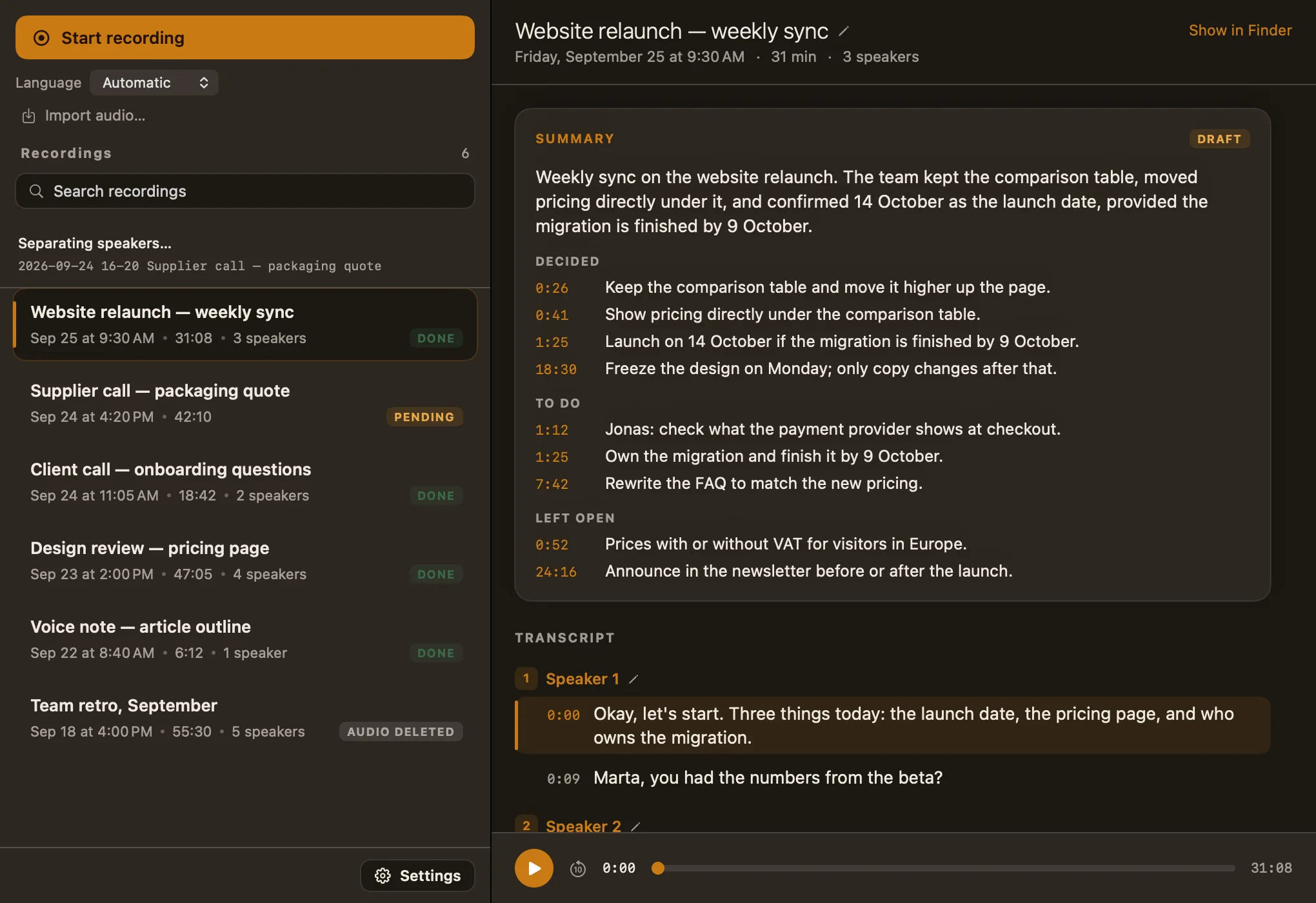
A mock-up of Memo's recording view. Click any timecode in the summary: the player jumps to that moment.
Before, during and after the meeting.
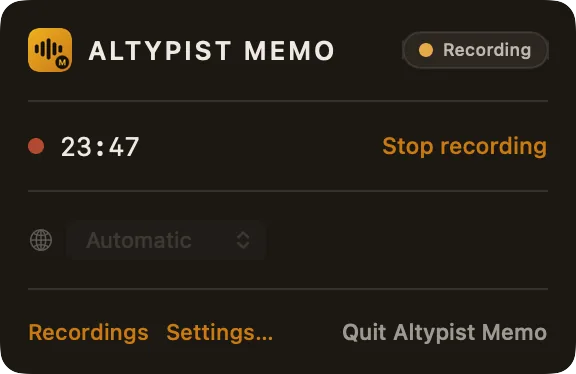
No calendar to connect and no meeting link to hand over. Memo is an ordinary Mac app with a window, a Dock icon and a menu bar panel.
-
Before
One click, or a file you already have.
Start from the window or from the menu bar. Pick the language first, or leave it on Automatic. Already recorded it on your phone? Import the file instead.
-
 During
It just records.
Straight to a file on disk, with no length limit. Close the window and it carries on; the Mac is kept awake until you stop.
- Crash-safe: what was recorded survives a crash
- A reminder every hour that it is still recording
- Won't start with under 2 GB free, and stops safely if the disk runs low
-
After
A transcript by speaker, then a summary.
Three steps in the background, each saved before the next begins. Quit halfway and Memo picks up where it stopped. Click a timecode in the summary to hear that moment.
A conversation
A short summary, then what was decided, what someone has to do, and what was left open.
DECIDED
0:41Show pricing directly under the table.
TO DO
1:12Jonas: check what the payment provider shows at checkout.
LEFT OPEN
0:52Prices with or without VAT for visitors in Europe.
Just you
A voice note or a dictated outline gets a short summary and its main points instead.
POINTS
0:12Open with the question readers actually ask.
1:40Move the pricing history to the end.
4:05Close on what changes for existing customers.
Speakers are numbers, not identities.
Memo works out who spoke when and labels them Speaker 1, 2, 3. It never learns who they are, and it keeps no voice profile anywhere.
- No voiceprints are created or stored
- Nothing carries over between recordings: Speaker 2 in one meeting has nothing to do with Speaker 2 in the next
- Rename per recording: call Speaker 2 “Marta” here, and nowhere else changes
- Two very similar voices can be merged into one speaker, so read the transcript before trusting the count
Website relaunch — weekly sync
Today at 9:30 · 3 speakers
- 1Speaker 1
- 2Marta
- 3Speaker 3
Renamed in this recording.
Client call — onboarding questions
Yesterday at 11:05 · 2 speakers
- 1Speaker 1
- 2Speaker 2
Untouched. Memo doesn't know it's a different Marta — or the same one.
Why it's built this way. A stored voiceprint is biometric data. A count of who spoke when is not. Memo keeps only the count, and that isn't a setting you could get wrong.
The same recording gives the same summary.
Memo summarises with the randomness switched off, so summarising the same transcript again produces the same words. A summary you can quote shouldn't change while you're quoting it.
- The model never writes a timecode. Memo finds the transcript line each point came from and takes the time and the speaker from there
- If no line matches well enough, the point is shown without a time instead of with a guessed one
- Marked draft in the app and in the file: a model small enough for a laptop is not a court reporter, and the full transcript is always beside it
- Written in the language of the recording, or always in English — your choice in Settings
matched to the line it came from — time and speaker come from here
In the transcriptPlain files in a folder. No database.
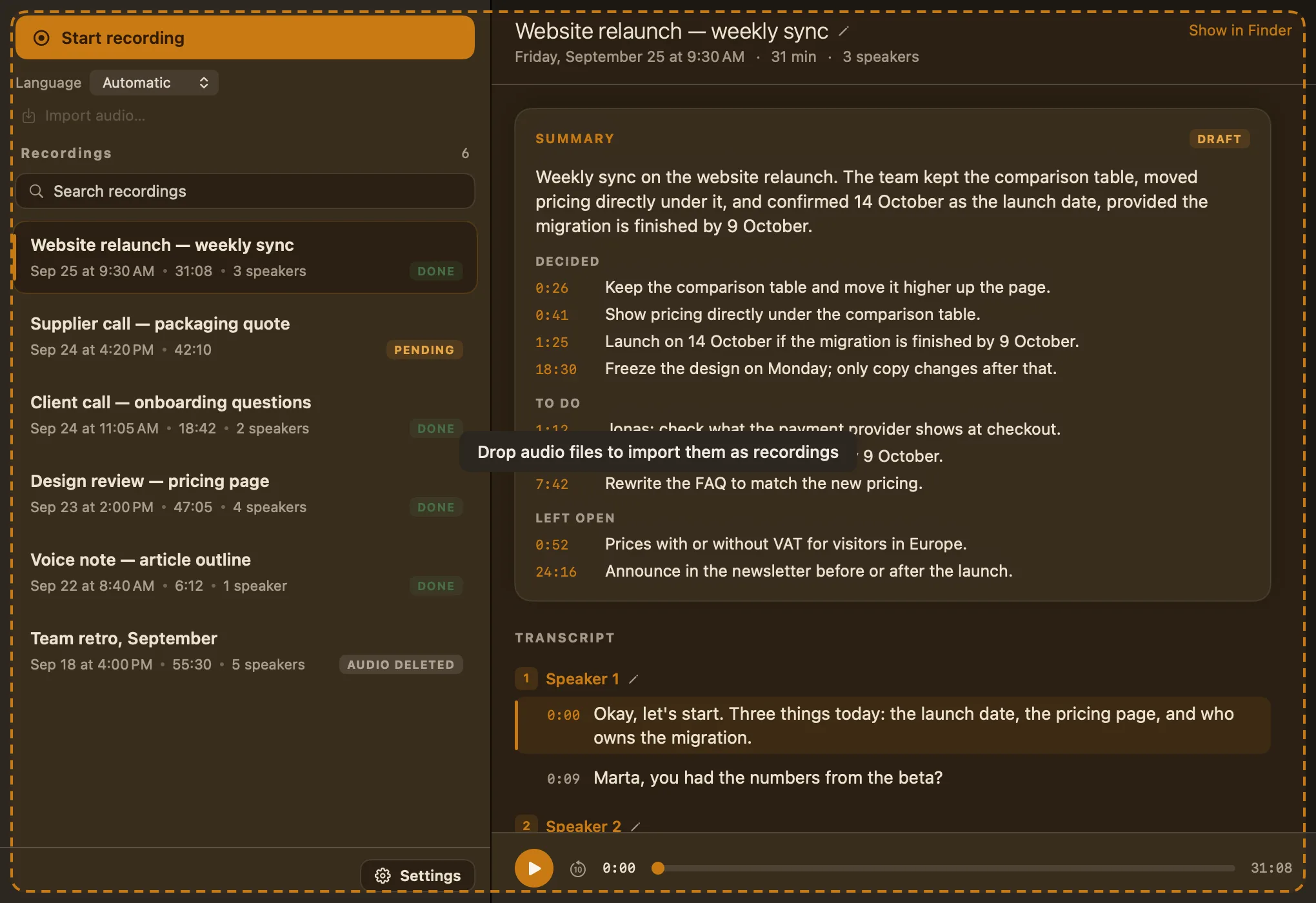
Every recording is a folder of ordinary files in ~/Documents/Altypist Memo — or wherever you point it. Open them, move them, back them up or delete them without asking the app.
- transcript.md and summary.md are Markdown with the timecodes kept in, readable in any editor
- This is how the text goes elsewhere: there's no export button, because there's nothing to export from
- Show in Finder from any recording takes you to its folder
- Ordinary files, so Spotlight, Time Machine and Dropbox treat them like any others
- 2026-09-25 09-30 Website relaunch — weekly sync
- 2026-09-24 16-20 Supplier call — packaging quote
- 2026-09-24 11-05 Client call — onboarding questions
- 2026-09-22 08-40 Voice note — article outline
Keep the words. Drop the audio when you like.
The recording itself is the heaviest file and often the most sensitive. Tell Memo how long to keep it; the transcript and the summary always stay.
Deleted audio can't be brought back. Shortening the setting applies to recordings you already have.
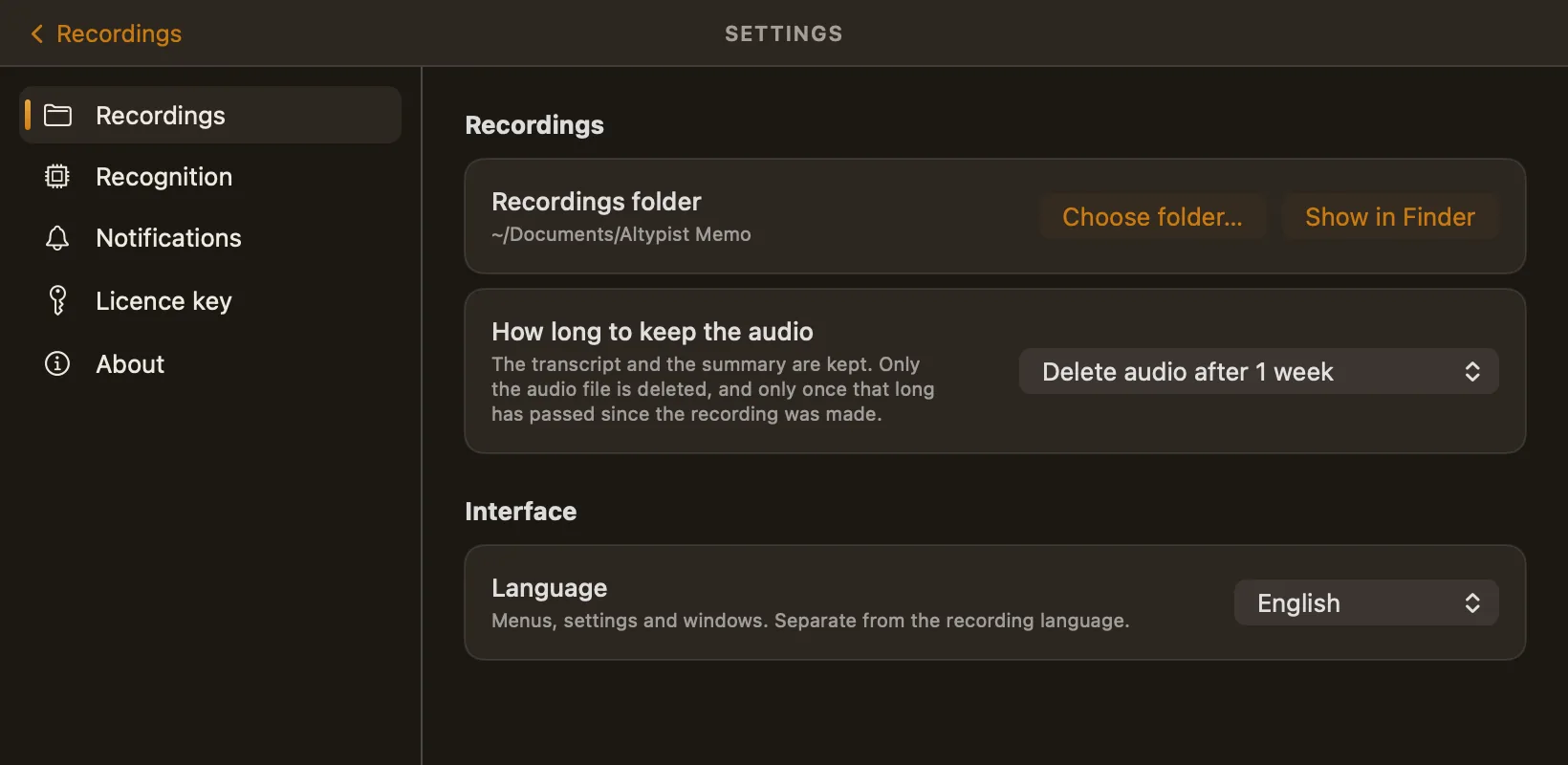
Already have the recording? Drop it in.
A voice memo from your phone, an interview, a lecture: imported files go through the same transcript, speakers and summary. Your original file is left exactly as it was.
- Drop it on the windowone file or several
- ⌘Oor File → Import Audio… in the menu bar
- Import audio…right under Start recording
- Open With in Finderor drop it on the Dock icon
Fifteen languages. Three model sizes.
Memo uses the same open Whisper models as Altypist. Leave the language on Automatic, or fix it before you start recording.
| Model | Download | Accuracy | Languages |
|---|---|---|---|
| Altypist Small | ~600 MB | ~90% | English only |
| Altypist MediumDefault | ~1.6 GB | ~91% | All 15 + Automatic |
| Altypist Large | ~3 GB | ~92% | All 15 + Automatic |
Accuracy is the model authors' published word-error rate on standard benchmarks, not our own measurement. The model you pick downloads once, on first use. Speaker separation runs in a separate helper with its own model, and summaries use Qwen2.5-1.5B on your Mac; neither is a choice you need to make.
A meeting recorder with no server behind it.
Many meeting-notes services upload the recording or the transcript and ask you to trust their retention policy. Memo has nowhere to upload to. Once the models are on your Mac, switch the network off and it still records, transcribes, separates speakers and writes the summary.
Consent is your call. Recording laws differ between countries and states. Make sure you have whatever consent is needed where you and the other people are. (Memo shows that it's recording the whole time it runs; telling people is easy, but getting consent is your responsibility.)
Never sent
- Your recordings
- Transcripts
- Summaries
- Speaker names you type
- Recording titles or folder names
No analytics SDK, no usage tracking, no account.
Everything that does go over the network
The complete list. None of it carries your audio or your words.
- Model downloadson first use
The speech model you pick, the speaker-separation model and the summary model download once from Hugging Face. After that they live on your Mac.
- Licence checkonly once you enter a key
Activation and an occasional validation with our licence server, so a key can count its Macs. A trial never contacts it. Once activated, the licence keeps working offline.
- One install countonce, ever
A single anonymous message: which app, its version, your macOS version and chip type. No identifier of any kind, so it can't be tied to you, a download or a purchase.
- Update checksautomatic
Asks our update feed whether a newer version of Memo exists — and Altypist's feed, so it can mention when Altypist has an update.
Memo hears what your microphone hears.
It records your Mac's default microphone — not the sound coming out of your speakers or headphones. In a room, that's everyone. On an online call, put the call on speaker so the microphone picks up both sides.
Memo doesn't capture system or app audio, and it doesn't connect to Zoom, Meet, Teams or your calendar.
In a room, or a call on speaker
- You
- Everyone else
A call on headphones
- You
- The other side
One types as you speak. The other keeps the conversation.
Altypist
Press a shortcut, speak, and the words appear wherever your cursor is — in Mail, Slack, a document or a terminal. Nothing is kept.
Altypist Memo
Records a meeting or takes an audio file, and keeps the transcript by speaker, a timecoded draft summary and, if you want it, the audio.
Both run entirely on your Mac, and a licence counts Macs, not apps: both apps on one Mac use one seat. Owning Altypist doesn't include Memo, but together they cost $79 $24.99 on one Mac instead of $29.98, or $119 $36.99 on three Macs — and if you already own one, the other is $30 $10.00. See the bundle.
Buy it once. Record as much as you like.
One payment, no expiry, updates included for the whole major version. A licence is a number of Macs, not a number of hours. Try every feature free for 7 days first — no card, no account.
Price for the first 100 Temporary launch price for our first 100 customers. The regular price is struck through.
- Unlimited recordings, no length limit
- Updates within the major version
- Works offline once activated
- Everything in Starter
- Your laptop, your desktop and a spare — up to 3 Macs
- Lifetime licence
A practice, firm or clinic: tell us how many seats and we will send a quote.
Contact usPrices are in USD and exclude VAT; in the EU and the UK, VAT is added at checkout at your local rate before you confirm. 14 days to get your money back, no questions asked — refund policy. More than 3 Macs, an invoice or a signed agreement? Volume pricing.
Dictating as well? Take both.
Altypist types what you say into any app; Memo records and summarises the conversation. Seats count Macs, not apps: both on one Mac use one seat. Already own one? Send us your key and the other is $30 $10.00.
Fair questions, straight answers.
Does it record the other side of an online call?
Only if your microphone can hear it. Memo records the Mac's default microphone and nothing else — not system audio, not a particular app. For a Zoom, Meet or Teams call, use the speakers rather than headphones so the microphone picks up both sides. With headphones on, Memo records only you.
That's also why no bot joins the call: there's no integration with the meeting service at all.
How long does an hour of audio take?
A few minutes on an M-series Mac, most of it transcription; speaker separation takes about 45 seconds of it. It runs in the background, and each step is saved before the next starts, so quitting halfway loses nothing — Memo carries on next time you open it.
Can I export or copy the transcript?
Not from inside the app: there's no export, share or copy button. Instead every recording is a folder of plain files — transcript.md and summary.md are Markdown with the timecodes kept in. Choose Show in Finder on a recording and open, copy, email or paste them wherever you like.
Can I search my recordings?
By title: a search field appears once you have more than four recordings, and titles are written from the summary automatically (you can edit them). Memo doesn't search inside transcripts; because they're ordinary Markdown files, your own tools and Spotlight can.
How much can I trust the summary?
Treat it as a draft — the app labels it one. A model small enough to run on a laptop summarises less well than a large one in a data centre. What makes it checkable: each point links to the transcript line it came from, so checking is a click, and the same transcript always gives the same summary. There's no regenerate button or custom prompt.
Summaries are written in the recording's language or always in English, as you choose; English is usually the better summary.
Can it tell two similar voices apart?
Usually. Clearly different voices separate reliably; two very similar ones can be merged into a single speaker. Renaming fixes a label, not a merge — so in a group where several people sound alike, read the transcript rather than trusting the count.
Which languages does it understand?
Fifteen, plus Automatic (the default): English, German, French, Spanish, Italian, Portuguese, Dutch, Polish, Serbian, Ukrainian, Russian, Chinese, Japanese, Korean and Hindi. The language is fixed when a recording starts. The Small model is English only; Medium and Large handle all fifteen. The app's own interface comes in the same fifteen languages; it follows your Mac's language, or pick one in Settings.
What exactly goes over the network?
Four things, none of them your audio or your text:
- model downloads from Hugging Face, on first use;
- licence activation and validation — only once you've entered a key;
- one anonymous install count, sent once: app, version, macOS version and chip type, with no identifier;
- automatic update checks, for Memo and for Altypist's feed.
There's no analytics SDK, no usage tracking and no account.
What happens when the trial ends?
Recording and importing stop until you enter a licence. Everything you recorded stays readable — transcripts, summaries and playback are never locked, with or without a licence.
Which Macs does it run on, and what does it need?
Apple Silicon (M1 or later) with macOS 15 or later; Intel Macs aren't supported. The app is about 25 MB and the speech model you choose is 600 MB to 3 GB, downloaded on first use. It asks for the microphone and nothing else — no Accessibility permission, no calendar.
I already have Altypist. Do I need this?
Only if you want to keep conversations. Altypist is for dictation: you speak, the words appear at your cursor, and nothing is kept. Memo records the whole conversation and keeps the transcript, the speakers and a timecoded draft summary in files you own. Owning Altypist doesn't include Memo; if you already have one, the other is $30 $10.00.
What if it isn't right for me?
Start with the free 7 days — every feature, no card, no account. If you've already bought, you have 14 days to ask for a full refund, no reason required. Refund policy.
Record the next meeting. Keep every word.
macOS 15+ · Apple Silicon · a 25 MB download